Skip to content
BLUE OAK MEDIA

Service · Paid Advertising

Make every campaign answer to the business.

Google, Meta and Local Services Ads, managed alongside your landing pages, call tracking and sales data. See where the budget goes and which campaigns bring people through the door.

Inside the Blue Oak portal
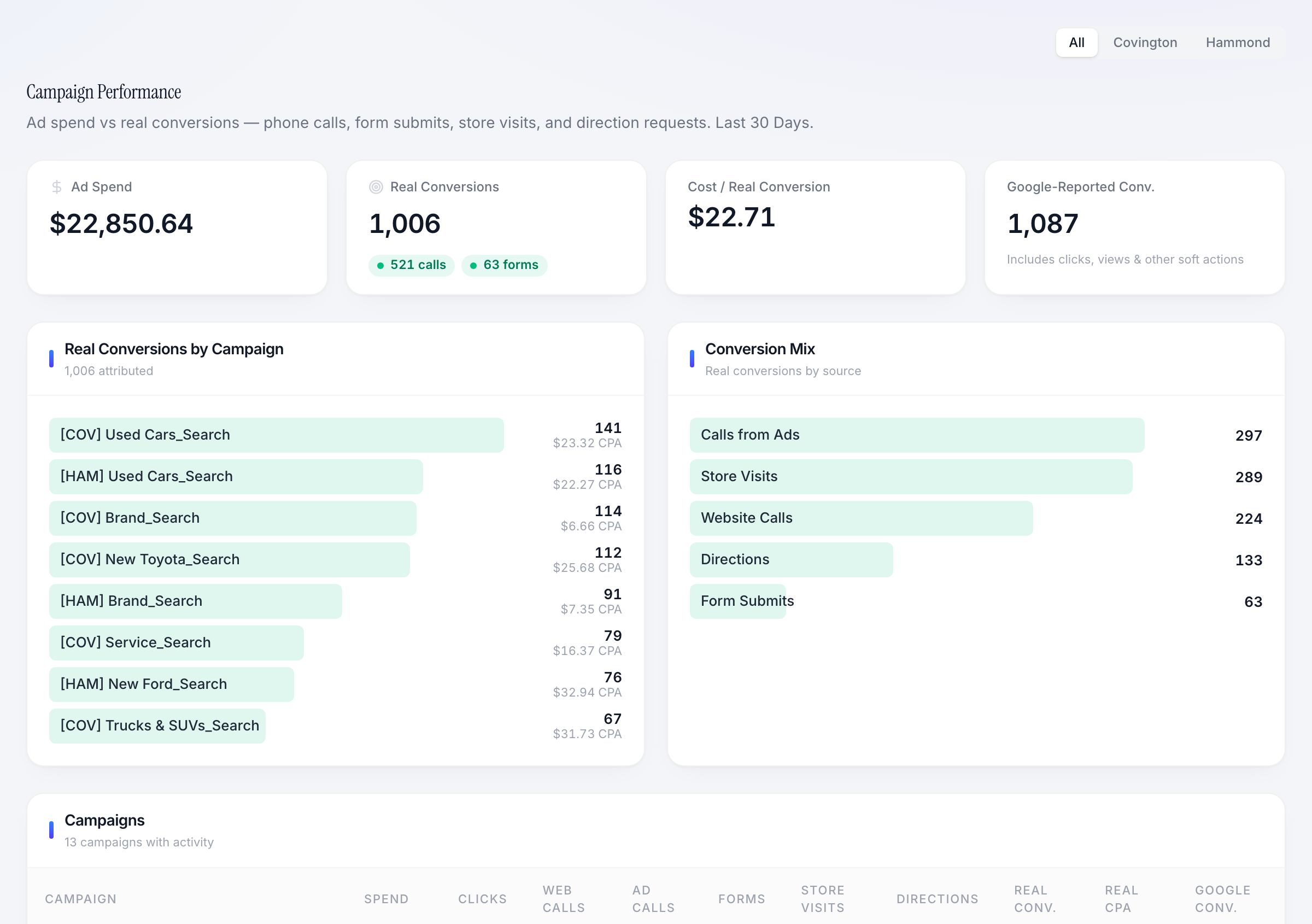
Dealership campaign performance with ad spend, conversion mix and campaign comparison
Campaign spend and tracked actions, together in the client portal.
  • Google · Meta · LSA
  • Campaign-level visibility
  • Landing pages + tracking
The service, made visible

See what this looks like in practice.

Real screens from our client portal, with the decisions and workflows they support.

Bayou Ridge Auto Group
Dealership campaign performance with ad spend, conversion mix and campaign comparison
View full-size screenshot

Know what each campaign is producing.

The dealership view compares campaign spend with calls, forms, store visits and direction requests. Platform-reported conversions remain visible as a separate measure.

What this helps you do

Investigate the mix of actions behind a conversion total before changing your budget.
Magnolia Crest Roofing & Restoration
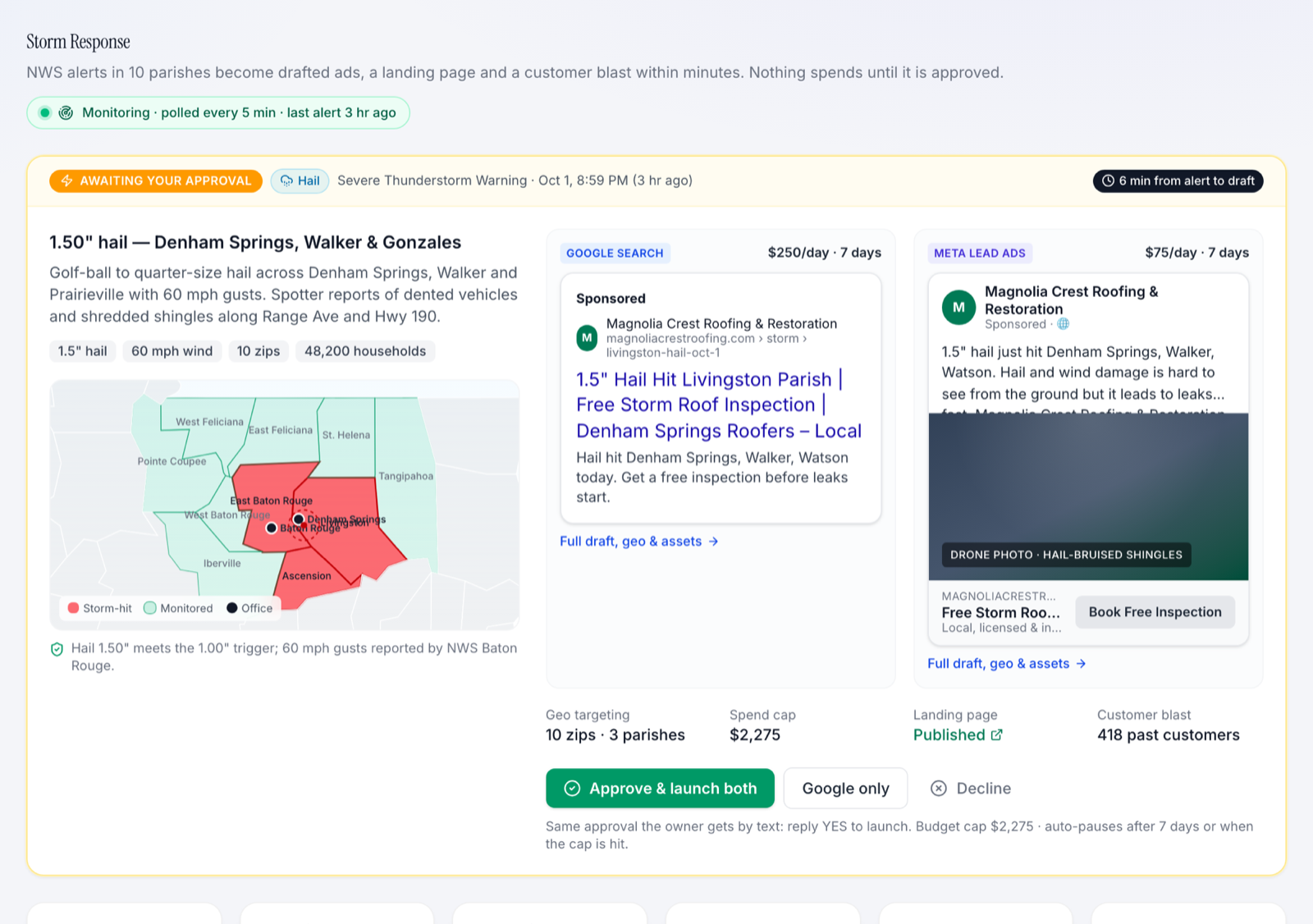
Roofing company storm response showing a service-area map, draft ads and approval controls
View full-size screenshot

Respond to a local event with a prepared plan.

The roofing view brings a storm area, proposed Google and Meta ads, daily budgets and an approval decision onto one screen.

What this helps you do

Review the geography, offer and spending limit together before approving a response.

Example workflow

A campaign built for a service area.

  1. 01

    Choose the service, offer and territory.

  2. 02

    Build matching ads, landing page and tracking.

  3. 03

    Review leads and campaign cost, then adjust.

The work we do

Paid Advertising, built around your business.

  • 01

    Channel strategy & management

    Search, shopping, paid social and eligible Local Services Ads organized around your services, locations and goals.

  • 02

    Creative & landing pages

    Offers, ad copy and focused landing pages built around the same customer need.

  • 03

    Conversion tracking

    Calls and form submissions connected to their source, with CRM outcomes added where the integration supports them.

  • 04

    Budget & territory planning

    Review pacing, service areas and campaign performance together before moving the next dollar.

Working together

A clear path from setup to improvement.

  1. 1

    Audit the account

    Check campaign structure, search terms, tracking and the pages people land on.

  2. 2

    Build the launch plan

    Agree on offers, markets, budgets and what counts as a useful lead.

  3. 3

    Review and improve

    Use campaign and lead data to guide creative tests, exclusions and budget changes.

What you gain

Make the next decision with confidence.

  • Spend by campaign

    See which campaigns use the budget and what actions they generate.

  • Lead quality

    Compare calls and forms with downstream sales information when available.

  • A clear next move

    Know what we are testing, changing and watching next.

Take a closer look

Explore the portal for yourself.

Choose an industry, complete the short demo request and explore the sample business inside the portal.

Ready to put a marketing + technology team behind your business?

20-minute intro call. We'll tell you what we'd build first.

Free evaluation

Schedule a free growth evaluation

Tell us where you're trying to grow. We'll look at your site, ads, local presence, and automation gaps before we talk.

No sales deck. Just the first three moves we would make.