
Skip to content
BLUE OAK MEDIA

Service · Analytics & Reporting

Your marketing, in one clear view.

Bring ad spend, calls, forms and connected sales data into a client portal. Look across channels and locations, understand what each metric means and use the same numbers to decide what comes next.

Inside the Blue Oak portal
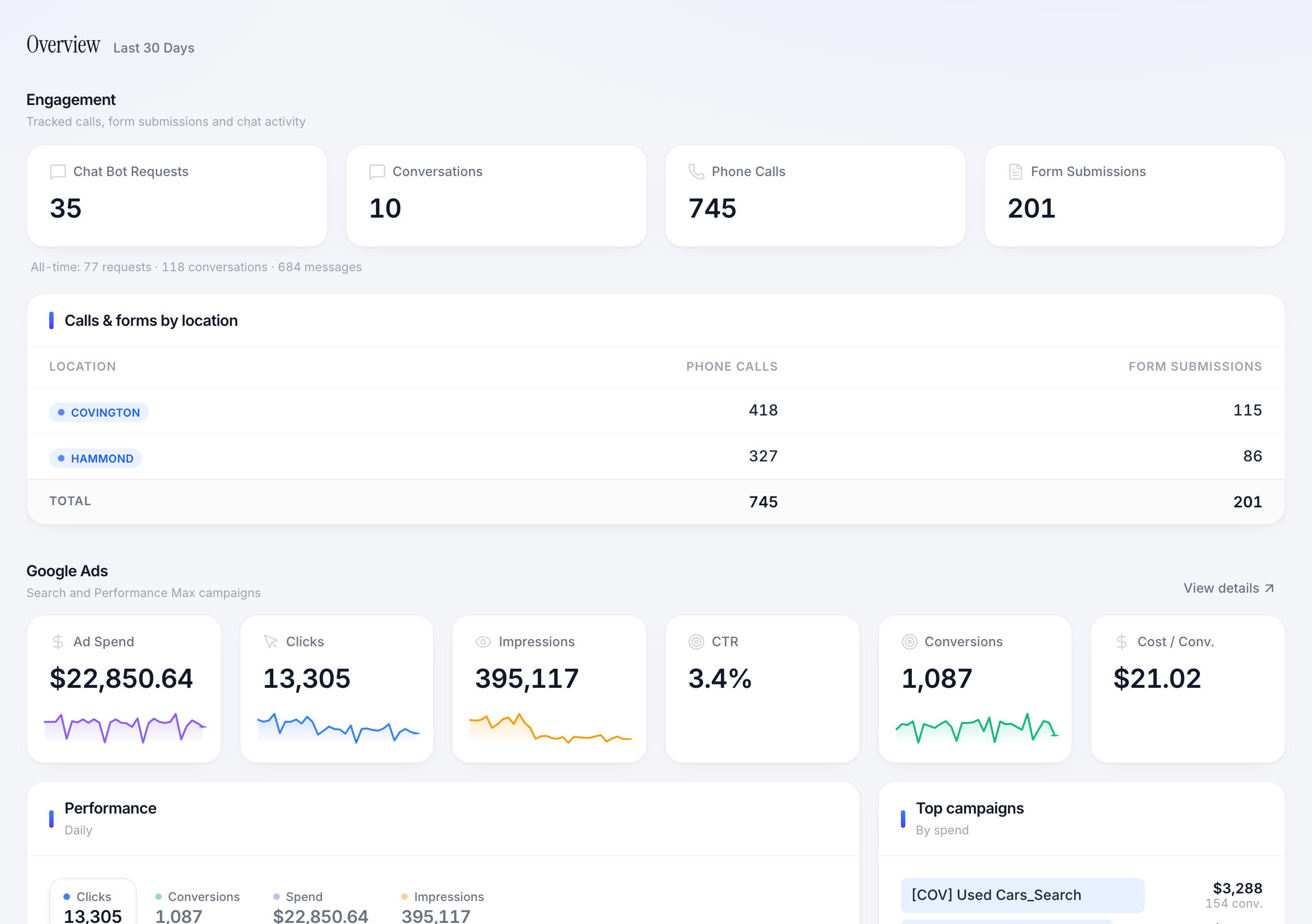
Dealership overview showing engagement totals by location and advertising performance
Calls, forms and advertising activity, visible without assembling a report.
  • Channels + locations
  • Lead-source context
  • Shared definitions
The service, made visible

See what this looks like in practice.

Real screens from our client portal, with the decisions and workflows they support.

Bayou Ridge Auto Group
Dealership overview showing engagement totals by location and advertising performance
View full-size screenshot

Start with a shared overview.

The dealership view brings calls, forms, chat activity and Google Ads performance together, with location totals that help the team compare the two stores.

What this helps you do

Find the area that needs attention, then move into the detail behind it.
Bayou Ridge Auto Group
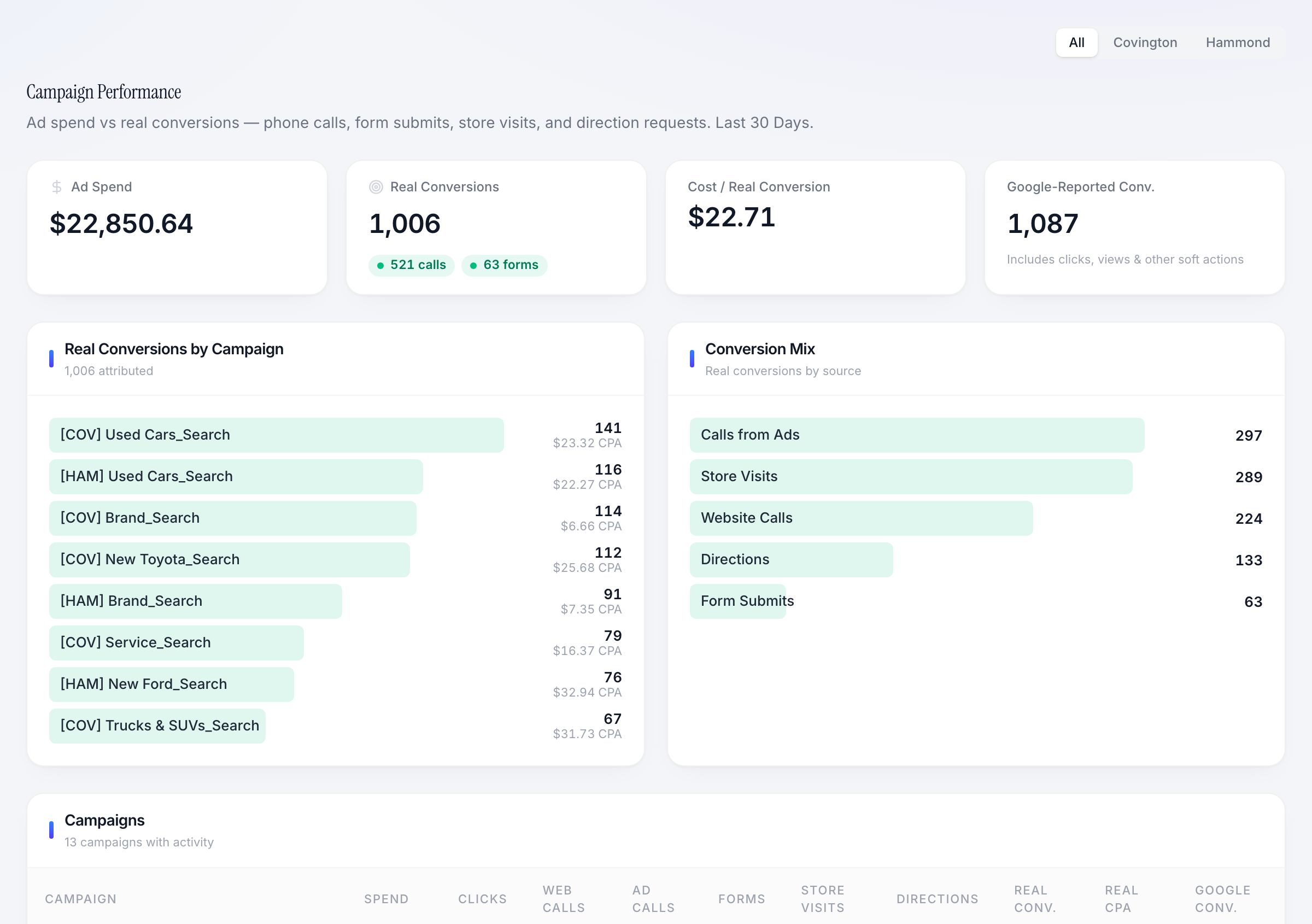
Dealership campaign report separating tracked actions from platform-reported conversions
View full-size screenshot

Read the definition behind the number.

The campaign view separates platform-reported conversions from tracked actions and breaks out the conversion mix. Calls, forms, store visits and directions are different signals.

What this helps you do

Discuss a campaign using the actions it generated, without treating every conversion as a sale.

Example workflow

Answer a budget question with context.

  1. 01

    Review spend and tracked actions for the same period.

  2. 02

    Investigate the campaign, location or source in question.

  3. 03

    Compare available sales outcomes and choose the next test.

The work we do

Analytics & Reporting, built around your business.

  • 01

    Channel reporting

    Bring supported advertising and website data together with clear date ranges and location filters.

  • 02

    Lead visibility

    Review calls, form submissions and captured customer requests with their available source information.

  • 03

    Sales & job context

    Connect supported CRM or job data so marketing conversations include downstream business outcomes.

  • 04

    A shared scorecard

    Define the measures, attribution limits and refresh schedules your team needs to interpret the report.

Working together

A clear path from setup to improvement.

  1. 1

    Connect the sources

    Confirm account access, supported integrations and the data each system can provide.

  2. 2

    Agree on definitions

    Separate platform conversions, tracked leads and closed sales so the team reads the numbers consistently.

  3. 3

    Review the decisions

    Use the portal to investigate questions and choose changes to budgets, pages or follow-up.

What you gain

Make the next decision with confidence.

  • Channel visibility

    See the spend and activity behind each part of the marketing plan.

  • Business context

    Compare marketing activity with available sales and job records.

  • Useful discussions

    Spend review time deciding what to change, with the source data in reach.

Take a closer look

Explore the portal for yourself.

Choose an industry, complete the short demo request and explore the sample business inside the portal.

Ready to put a marketing + technology team behind your business?

20-minute intro call. We'll tell you what we'd build first.

Free evaluation

Schedule a free growth evaluation

Tell us where you're trying to grow. We'll look at your site, ads, local presence, and automation gaps before we talk.

No sales deck. Just the first three moves we would make.