
Skip to content
BLUE OAK MEDIA

Service · AI Chatbots

Answer the question. Keep the opportunity.

Help website visitors get useful answers about products, services and availability, then pass the conversation to your team. We build the assistant around your business data and explicit limits.

Inside the Blue Oak portal
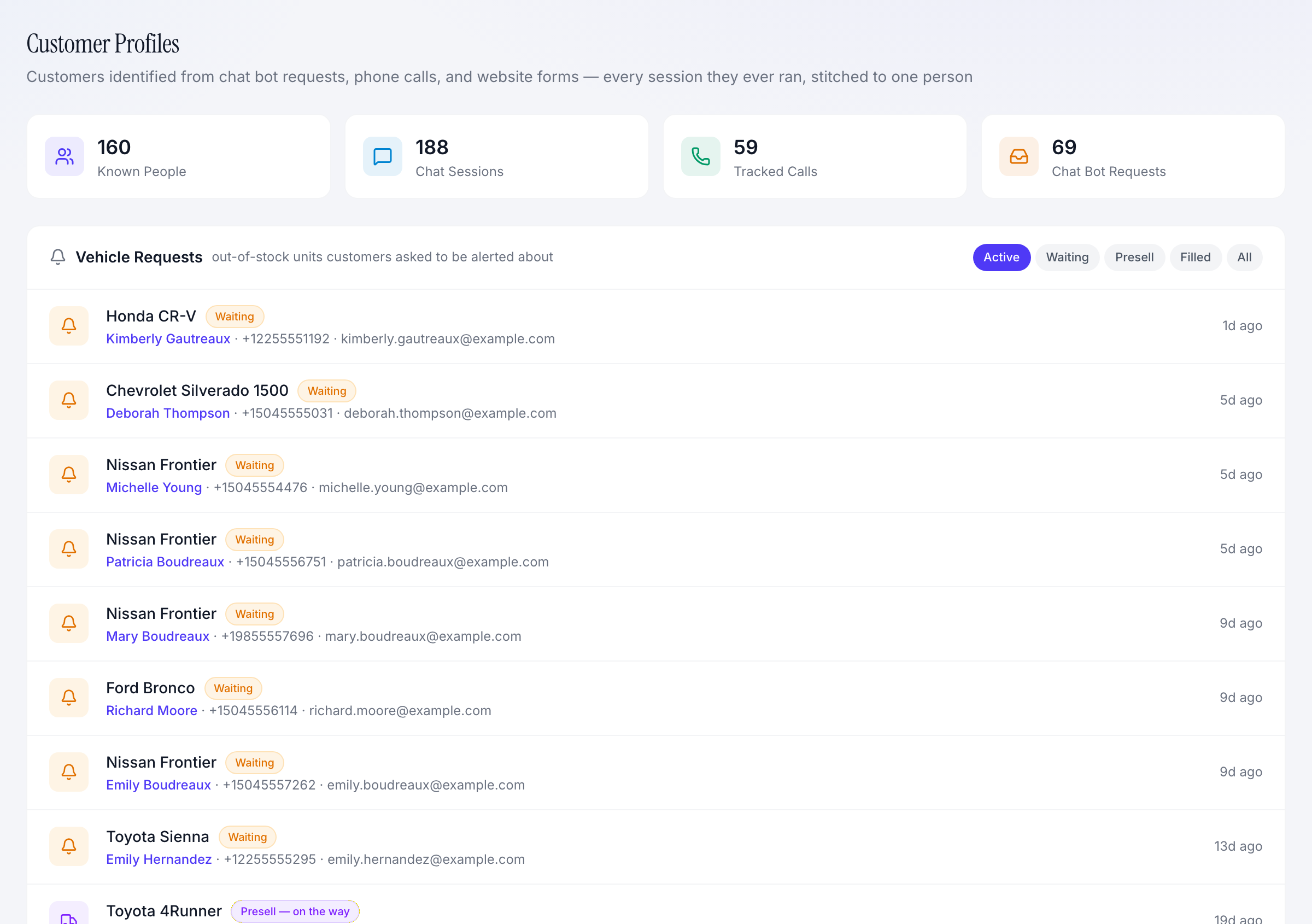
Dealership customer profiles with chat activity totals and vehicle-interest requests
Make customer questions actionable for the team following up.
  • Business-specific answers
  • Captured customer intent
  • Human handoff
The service, made visible

See what this looks like in practice.

Real screens from our client portal, with the decisions and workflows they support.

Bayou Ridge Auto Group
Dealership customer profiles with chat activity totals and vehicle-interest requests
View full-size screenshot

Keep the request after the conversation.

The dealership view connects known customers, chat activity and vehicle requests. A customer looking for an unavailable vehicle can remain a visible opportunity for staff.

What this helps you do

Follow up with the requested product and status in view, instead of asking the customer to start over.
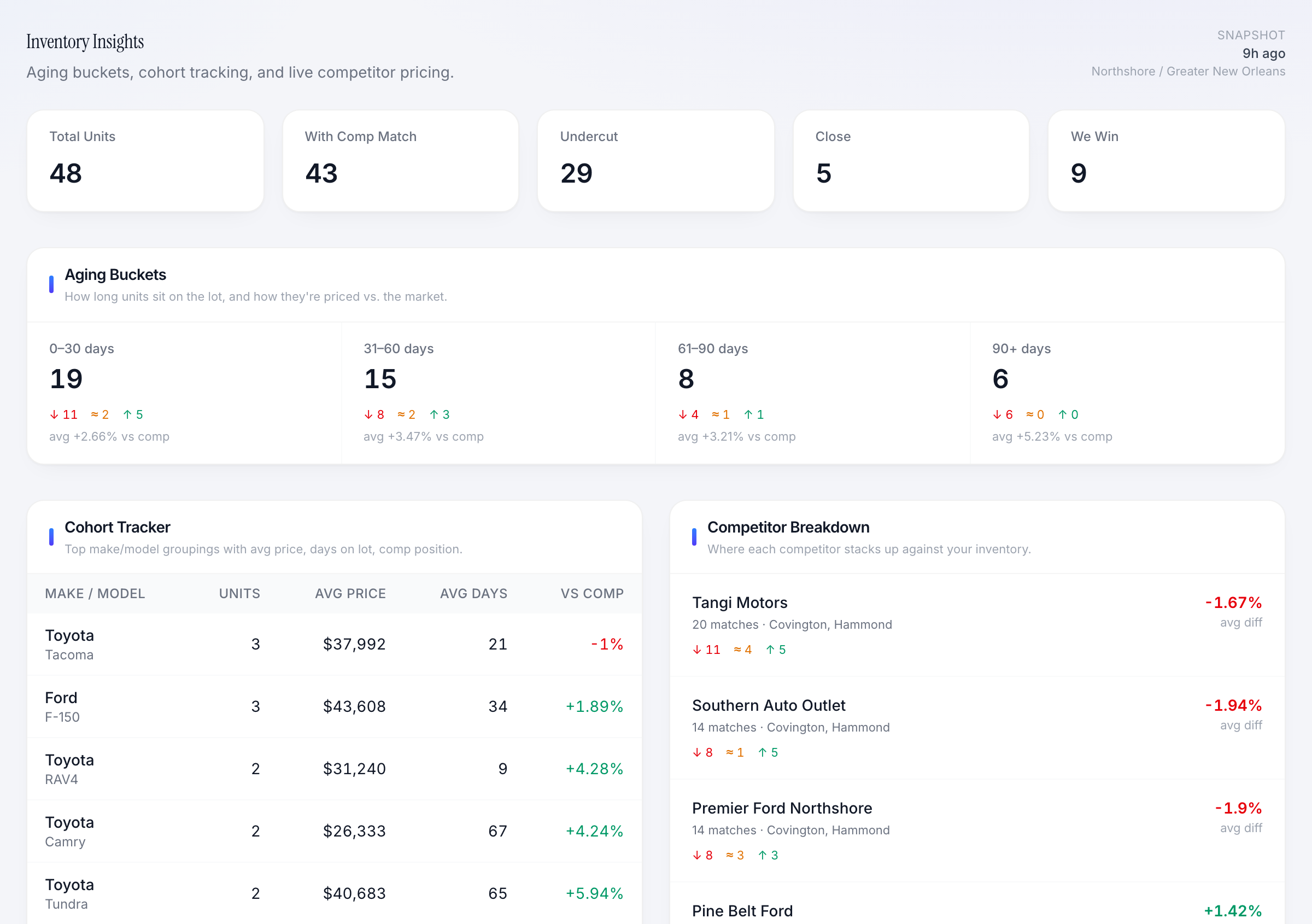
Bayou Ridge Auto Group
Dealership inventory insights with vehicle cohorts, aging buckets and market comparisons
View full-size screenshot

Ground the conversation in business information.

The inventory view shows stock, vehicle groups, age and market comparisons. Product data is part of the foundation we connect when building a dealership assistant.

What this helps you do

Define reliable source data and refresh rules before asking an assistant to answer availability questions.

Example workflow

From an after-hours question to a handoff.

  1. 01

    A visitor asks about a product or service.

  2. 02

    The assistant uses approved information and captures the request.

  3. 03

    Your team receives the context for the next conversation.

The work we do

AI Chatbots, built around your business.

  • 01

    Business knowledge

    Connect approved product, inventory, service and policy information; define how it stays current.

  • 02

    Lead capture & requests

    Collect contact details and customer interests so a useful conversation becomes a follow-up opportunity.

  • 03

    Human handoff

    Set escalation rules for questions, exceptions and promises that need a person.

  • 04

    Conversation review

    Use captured requests and available transcripts to find gaps and improve the assistant over time.

Working together

A clear path from setup to improvement.

  1. 1

    Define the job

    Choose the questions the assistant should answer, the data it can use and the actions it can take.

  2. 2

    Test the boundaries

    Check availability, pricing, unanswered questions and handoffs before opening it to customers.

  3. 3

    Launch with oversight

    Review conversations and requests, refresh the knowledge and tune the experience.

What you gain

Make the next decision with confidence.

  • Captured intent

    Give staff the product or service interest behind a request.

  • Useful answers

    Make routine information easier to find outside business hours.

  • Clear accountability

    Keep a human responsible for exceptions, follow-up and final decisions.

Take a closer look

Explore the portal for yourself.

Choose an industry, complete the short demo request and explore the sample business inside the portal.

Ready to put a marketing + technology team behind your business?

20-minute intro call. We'll tell you what we'd build first.

Free evaluation

Schedule a free growth evaluation

Tell us where you're trying to grow. We'll look at your site, ads, local presence, and automation gaps before we talk.

No sales deck. Just the first three moves we would make.